
🚀 The Catalyst Optimizer
In our last post, we learned about Lazy Evaluation: Spark waits until the last moment to execute so it can build a "plan."
But how is that plan built? And how does Spark know that "filtering before joining" is faster than "joining before filtering"?
Meet the Catalyst Optimizer.
The Catalyst Optimizer is Spark's extensible query optimizer that operates on DataFrames and Datasets. It takes your high-level transformations, applies rule-based optimizations (like predicate pushdown and constant folding), and generates an optimized physical plan for execution. Unlike RDDs where you control every step, Catalyst automatically rewrites your code for performance.
The Workflow: From Query to RDDs
The diagram below shows the journey of your code. Every time you run a DataFrame transformation, Catalyst guides it through these four phases before a single task is launched on the cluster .
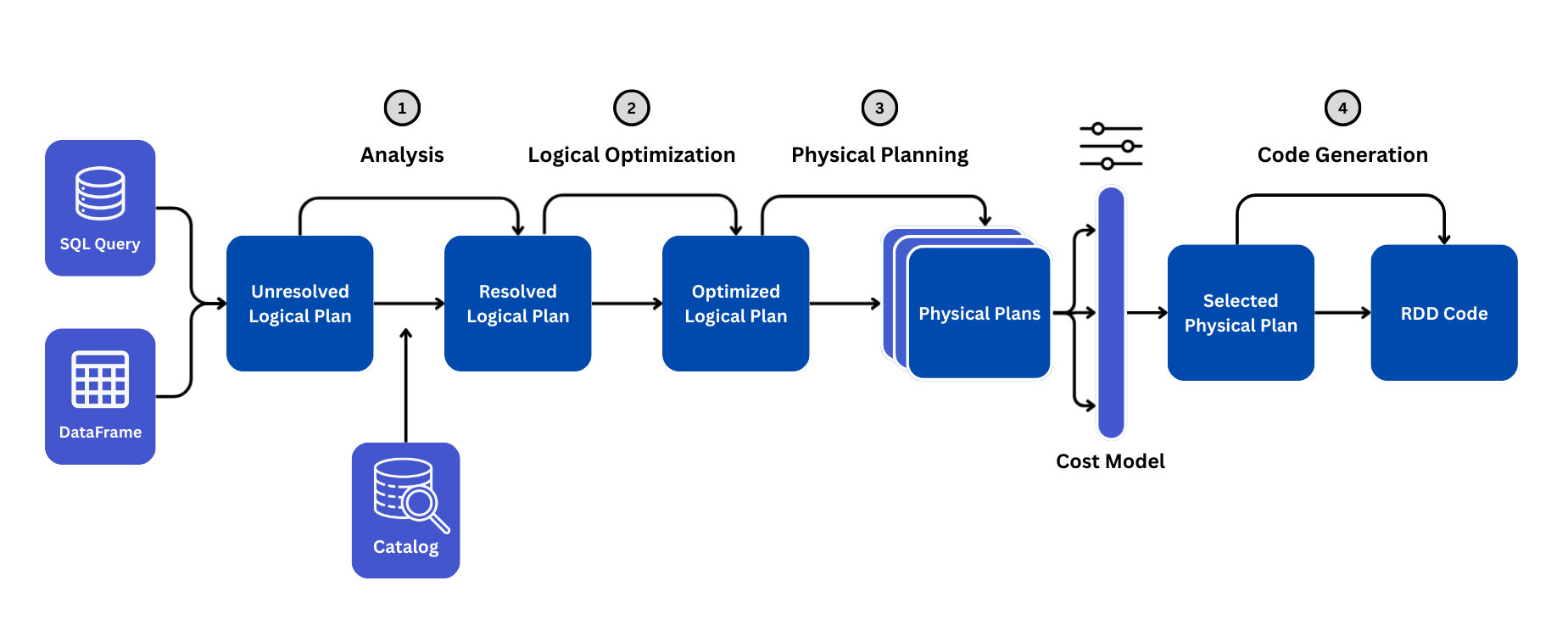
Phase 1: Analysis (From Unresolved → Resolved Logical Plan)
When you type df.select("name"), Spark doesn't know if "name" exists or if it's a typo.
- The Unresolved Logical Plan: Spark reads your code but hasn't checked validity yet.
- The Catalog: Catalyst looks up the Table/DataFrame metadata.
- Resolution: It confirms: "Does column 'name' exist? Is it a string or int?" If correct, it creates the Resolved Logical Plan.
Ever noticed AnalysisException error like this in your code?
AnalysisException: Column 'nam' does not exist.
Did you mean one of the following? [id, name]
This phase is where Spark catches mistakes like missing columns, type mismatches, or referencing non-existent tables. Since Spark uses lazy evaluation, these errors only surface when you call an action - not when you write the transformation. Common triggers include typos in column names, using columns that were dropped earlier in the pipeline, or schema mismatches after joins.
Phase 2: Logical Optimization (Rule-Based Transformations)
Catalyst applies rule based optimizations to simplify and improve your query logic. These transformations are independent of physical execution and they focus purely on restructuring the logical plan for efficiency.
- Predicate Pushdown: Moves
filter()commands as close to the data source as possible. - Projection Pruning: Removes columns you didn't select early in the chain.
- Constant Folding: Converts
col("salary") * (100 + 10)→col("salary") * 110. - Boolean Simplification: Simplifies
filter(TRUE and condition)tofilter(condition).
Result: An Optimized Logical Plan.
Phase 3: Physical Planning (Choosing the Execution Strategy)
Catalyst now knows what to compute, but needs to decide how to execute it efficiently. The Physical Planner generates multiple execution strategies and selects the best one based on cost estimates.
- "Should I join these tables using a Sort Merge Join or a Broadcast Hash Join?"
- "Should I scan the whole file or use partition pruning?"
The Cost Model: Spark estimates the "cost" (CPU, IO) of each strategy and picks the cheapest one. This is the Selected Physical Plan.
Phase 4: Code Generation (Tungsten)
Once the plan is finalized, Spark doesn't interpret it line-by-line like standard Python. Instead, it uses Whole-Stage Code Generation to compile the entire pipeline into optimized Java bytecode that runs directly on the CPU.
This eliminates the overhead of multiple function calls and virtual dispatches—essentially turning your query into a single, fast-executing function.
This is why PySpark performs nearly as fast as Scala: the Python API is just a thin wrapper that generates the same optimized bytecode under the hood.
Example: Catalyst Optimizer in Action
Let’s trace a simple query through the phases.
Your Code:
df1 = spark.read.csv("users.csv")
df2 = spark.read.csv("orders.csv")
joined = df1.join(df2, "user_id").filter(df2["amount"] > 100)
- Analysis: Checks if
users.csvandorders.csvexist and haveuser_id/amount. - Logical Optimization:
- Bad Plan: Join all users and orders (Shuffle huge data), THEN filter for amount > 100.
- Optimized Plan (Predicate Pushdown): Filter
ordersforamount > 100FIRST, then Join. (Drastically reduces data size).
- Physical Planning:
- Strategy A: Shuffle both large tables (SortMergeJoin).
- Strategy B: If
usersis tiny, send it to every node (BroadcastJoin). - Selection: Spark checks the file size. If
users< 10MB, it picks Strategy B (Broadcast).
- Code Gen: Creates a single Java function to read, filter, hash, and join in one pass.
How to See the DAG Plans in PySpark
Spark provides two primary ways to inspect the Catalyst Optimizer's work: the programmatic explain() method and the visual Spark UI.
1. The explain() Method
The quickest way to see the plan is by calling the .explain() method on any DataFrame. By default, this prints only the Physical Plan, which is the final strategy Spark has selected for execution.
To see the full journey from the unresolved code to the optimized strategy, you should use the mode="extended" parameter.
# Standard Physical Plan (Default)
df.explain()

# The Full Journey (Parsed, Analyzed, Optimized, Physical)
df.explain(mode="extended")

# A Cleaner, Formatted View of the Physical Plan
df.explain(mode="formatted")
When you run mode="extended", the output mirrors the four phases we discussed:
- Parsed Logical Plan: Your code as written (Unresolved).
- Analyzed Logical Plan: Metadata resolved against the Catalog.
- Optimized Logical Plan: After rules like Predicate Pushdown are applied.
- Physical Plan: The specific strategy (e.g.,
BroadcastHashJoin) chosen by the Cost Model.
2. The Spark UI (SQL Tab)
For complex queries, text output can be hard to read. The Spark UI provides a visual Directed Acyclic Graph (DAG) of the plan.
- Open the Spark UI (usually on port 4040 locally or the "Compute" tab in Databricks).
- Navigate to the SQL / DataFrame tab.
- Click on the description of your latest query (e.g., "collect at
").
This view visualizes the Physical Plan as a flowchart. You will see boxes representing operations like Scan csv, Filter, and Exchange (Shuffle). If you see a box labeled WholeStageCodegen, that indicates Tungsten has successfully collapsed multiple operations into a single optimized function.
Decoding the Plan Output
Let's look at the plan for a simple aggregation. In this example, we load customer data, group by city, and count the users.
You can also try to run this code and test it in our PySpark Online Compiler.
The Code:
df = spark.read.format('csv').option('header', 'true').load('/samples/customers.csv')
df = df.groupBy('city').count()
df.explain(mode='extended')
The Output:
== Parsed Logical Plan ==
'Aggregate ['city], ['city, count(1) AS count#2565L]
+- Relation [customer_id#2537,first_name#2538,last_name#2539,email#2540,phone_number#2541,address#2542,city#2543,state#2544,zip_code#2545] csv

== Analyzed Logical Plan ==
city: string, count: bigint
Aggregate [city#2543], [city#2543, count(1) AS count#2565L]
+- Relation [customer_id#2537,first_name#2538,last_name#2539,email#2540,phone_number#2541,address#2542,city#2543,state#2544,zip_code#2545] csv

== Optimized Logical Plan ==
Aggregate [city#2543], [city#2543, count(1) AS count#2565L]
+- Project [city#2543]
   +- Relation [customer_id#2537,first_name#2538,last_name#2539,email#2540,phone_number#2541,address#2542,city#2543,state#2544,zip_code#2545] csv

== Physical Plan ==
AdaptiveSparkPlan isFinalPlan=false
+- HashAggregate(keys=[city#2543], functions=[count(1)], output=[city#2543, count#2565L])
   +- Exchange hashpartitioning(city#2543, 200), ENSURE_REQUIREMENTS, [plan_id=1823]
      +- HashAggregate(keys=[city#2543], functions=[partial_count(1)], output=[city#2543, count#2570L])
         +- FileScan csv [city#2543] Batched: false, DataFilters: [], Format: CSV, Location: InMemoryFileIndex(1 paths)[file:/samples/customers.csv], PartitionFilters: [], PushedFilters: [], ReadSchema: struct<city:string>
Here is what that scary wall of text actually means, broken down by phase.
1. Parsing & Analyzing:
== Parsed Logical Plan ==
'Aggregate ['city], ['city, count(1) AS count#2565L]
+- Relation [customer_id#2537,first_name#2538,last_name#2539,email#2540,phone_number#2541,address#2542,city#2543,state#2544,zip_code#2545] csv

== Analyzed Logical Plan ==
city: string, count: bigint
Aggregate [city#2543], [city#2543, count(1) AS count#2565L]
+- Relation [customer_id#2537,first_name#2538,last_name#2539,email#2540,phone_number#2541,address#2542,city#2543,state#2544,zip_code#2545] csv
- What happened: Spark successfully looked up the schema.
- How do we know: Notice
city: string, count: bigint. In the "Parsed" step, it didn't know these types yet. Now, it has confirmed thatcityexists in the CSV and is a string. - Note on IDs: See those numbers like
#2543? Those are internal unique IDs Spark assigns to every column to track them, even if you rename them later.
2. Optimizing:
== Optimized Logical Plan ==
Aggregate [city#2543], [city#2543, count(1) AS count#2565L]
+- Project [city#2543]
   +- Relation [customer_id#2537,first_name#2538,last_name#2539,email#2540,phone_number#2541,address#2542,city#2543,state#2544,zip_code#2545] csv
- Catalyst in Action: We never told Spark to select only the
citycolumn. We just ran agroupBy. - The Optimization Logic: Catalyst realized that to count users by city, it does not need
email,phone_number, oraddress. - Project [city]: It inserted a
Project(Select) operation to effectively drop all other columns immediately. This is Column Pruning in action, saving massive amounts of memory.
3. Physical: "The Execution Strategy"
The Physical Plan is read from the bottom up.
== Physical Plan ==
AdaptiveSparkPlan isFinalPlan=false
+- HashAggregate(keys=[city#2543], functions=[count(1)], output=[city#2543, count#2565L])
   +- Exchange hashpartitioning(city#2543, 200), ENSURE_REQUIREMENTS, [plan_id=1823]
      +- HashAggregate(keys=[city#2543], functions=[partial_count(1)], output=[city#2543, count#2570L])
         +- FileScan csv [city#2543] Batched: false, DataFilters: [], Format: CSV, Location: InMemoryFileIndex(1 paths)[file:/samples/customers.csv], PartitionFilters: [], PushedFilters: [], ReadSchema: struct<city:string>
- FileScan csv: Spark reads the file. Notice
ReadSchema: struct<city:string>. Because of the optimization step above, it physically only pulls thecitycolumn from the disk. - HashAggregate (partial_count): This is a huge performance booster. Spark counts the cities on the local partition first (e.g., "I found 5 users in Chicago on this node").
- Exchange (Shuffle): Now, it must move data so that all "Chicago" records end up on the same node. This is the heavy lifting.
- HashAggregate (count): Finally, it sums up the partial counts from all nodes to get the total.
A Note on AdaptiveSparkPlan
You can see on the very first line of the Physical Plan:
== Physical Plan ==
AdaptiveSparkPlan isFinalPlan=false
This indicates that Adaptive Query Execution (AQE) is active.
isFinalPlan=false: This means the plan you see is just the initial strategy. As the job runs, Spark will monitor the actual data size. If the data turns out to be different than estimated (e.g., much smaller after filtering), AQE can pause execution and re-optimize the plan on the fly to be more efficient.
It is a powerful feature that deserves its own spotlight. We will be diving deep into AQE and how it dynamically fixes query performance in the upcoming posts!
Summary
| Phase | Input | What Happens? |
|---|---|---|
| Analysis | Code / SQL | Checks column names, types, and table existence. |
| Logical Opt | Resolved Plan | Reorders operations (Pushdown, Pruning) for efficiency. |
| Physical Plan | Optimized Plan | Selects algorithms (Hash Join vs Sort Merge, Broadcast). |
| Code Gen | Physical Plan | Compiles logic into raw Java Bytecode (Tungsten) for speed. |
Note - we have also introduced some terms here like Hash, Sort Merge, and Broadcast Joins. We'll be diving into these in the later posts.