
⚙️ Jobs, Stages, and Tasks
In the last post, we saw how the Catalyst Optimizer acts as the "brain," converting your code into an optimized plan.
But a plan is just a piece of paper. How does it actually run?
When you hit "Run," Spark breaks that plan down into three physical units of execution. If you want to debug performance or understand the Spark UI, you must master this hierarchy:
Job ⮕ Stage ⮕ Task
Let’s break them down.
1. The Job (1 Action → 1 Job)
A Job is the top-level unit. It represents a complete computation triggered by an Action.
- Lazy Evaluation: Remember, transformations (
select,filter,join) are lazy. Nothing happens until you call an action. - The Trigger: When you call an action like
.collect(),.count(), or.write(), Spark creates a Job. - Based on number of actions: 1 Action = 1 Job. (If you have 5
writecommands in your script, you will have 5 Jobs).
2. The Stage (At least 1 stage. Each wide dependency adds a new stage)
Spark processes jobs step by step using stages. It divides the Job into Stages. A Stage is a group of tasks that can run without needing data to move across the network.
The boundaries of a stage are defined by Data Shuffling.
What Is a Shuffle? A shuffle is what happens when Spark needs data from multiple partitions to come together and those partitions may live on completely different machines. It is the process of redistributing rows across executors over the network so that all rows sharing the same key land on the same partition.
Think of it like this: imagine 10 people each holding a pile of unsorted cards. To group all aces together, every person needs to send their aces to one designated person. This process of exchange of cards across people is the shuffle.
A shuffle is the most costly operation in a Spark job because it involves three heavy steps:
- Shuffle Write — each executor writes intermediate data to local disk, bucketed by target partition
- Network transfer — executors pull each other's data over the network
- Shuffle Read — each executor reads the incoming data and processes it
This means disk I/O + network I/O + serialization all hit at once. It also creates a hard synchronization point -> Stage 2 cannot begin until every task in Stage 1 has finished writing its shuffle output. This is why each wide dependency adds a new stage.
- Narrow Transformations (No Shuffle): Operations like
filter(),map(), ordrop()can be computed on a single partition without talking to other nodes. Spark groups these together into a single stage (this is called "Pipelining"). - Wide Transformations (Shuffle Required): Operations like
groupBy(),distinct(), orjoin()require data to move across the cluster (e.g., all "Sales" data must move to the same node to be summed). - The Cut: Whenever Spark encounters a Shuffle, it ends the current stage and starts a new one.
3. The Task (N partitions → N tasks in a stage)
This is the smallest unit of work. A Task is simply a unit of computation applied to a single partition of data.
- The Golden Rule: 1 Partition = 1 Task.
- If a stage has to process 100 partitions of data, Spark creates 100 tasks for that stage.
- These tasks are assigned to the CPU cores on your Executors.
The "How Many?" Guide
The most common interview question (and production headache) is: "How does Spark decide the number of tasks?"
It depends on whether you are reading data or shuffling data.
Scenario A: The First Stage (Reading Data)
When a job starts, the number of tasks is decided by your Input Data.
- File Sources: Spark creates one partition (one task) for every "split" of the file. By default, this is roughly every 128MB of data.
- Example: Reading a 1GB CSV file? approx. 8 Tasks (1024MB / 128MB).
- Example: Reading 10 tiny CSV files? 10 Tasks (1 file = 1 partition usually).
Scenario B: The Next Stages (After a Shuffle)
Once a shuffle happens (e.g., after a groupBy), the previous partitions are destroyed, and new ones are created.
- The Default: By default, Spark sets the number of post-shuffle partitions to 200.
- Set using the property:
spark.sql.shuffle.partitions
- Set using the property:
- The Consequence: Even if you only have 5MB of data, if you do a
groupBy, Spark will generate 200 Tasks for the next stage! (This is a common performance pitfall called "Over-partitioning").
Putting It All Together: How a Query Runs
Let’s trace a simple PySpark script to see how the hierarchy forms. Let's assume we are reading sales data, containing 10 CSV files of 100MB each.
# 1. Read Data (10 files, 100MB total)
df = spark.read.csv("/data/sales/")

# 2. Filter (Narrow)
filtered_df = df.filter("amount > 100")

# 3. Group By (Wide/Shuffle)
aggregated_df = filtered_df.groupBy("store_id").count()

# 4. Write Action
aggregated_df.write.parquet("/output/counts")
Step 1: Identify Jobs
- There is only one Action:
.write(). - Total: 1 Job.
Step 2: Identify Stages
- Spark looks at the plan. It sees
readandfilter(Narrow) followed bygroupBy(Wide). - It draws a line at the
groupBy. - Stage 1: Read + Filter + Map-side GroupBy (Pre-shuffle).
- Stage 2: Reduce-side GroupBy + Write (Post-shuffle).
- Total: 2 Stages.
Step 3: Identify Tasks
- Stage 1 Tasks: We are reading 10 files.
- Result: 10 Tasks (1 per file).
- Stage 2 Tasks: We did a shuffle. Spark checks
spark.sql.shuffle.partitions.- Result: 200 Tasks (Default).
Here's what the flow would look like for this example -
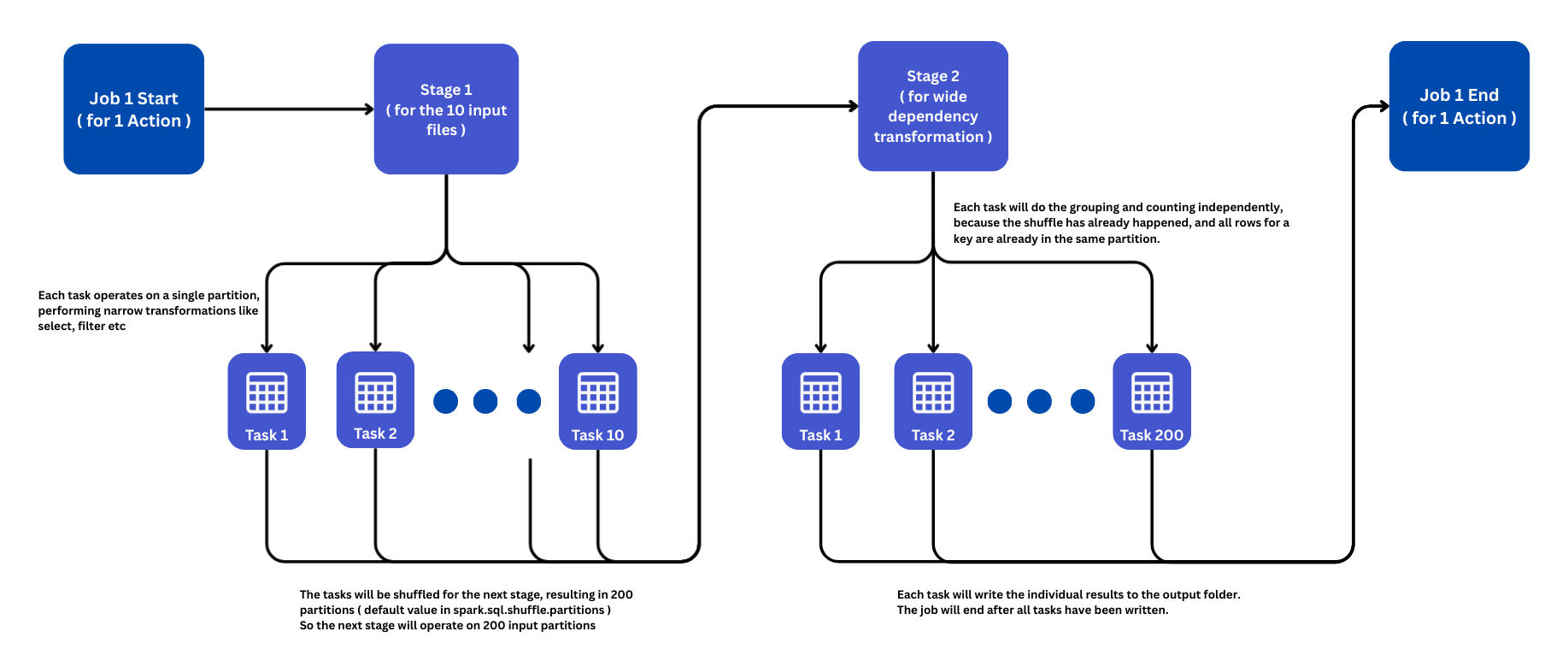
Total Execution: 1 Job, consisting of 2 Stages, launching 210 Tasks in total.
Interview Question - A 1TB CSV file is read into Spark and aggregated by country to compute total revenue. How many jobs, stages, and tasks will Spark create?
Assuming standard Spark defaults (128 MB block size, 200 shuffle partitions) and that you trigger an action (like write or collect) with a pre-defined schema, the execution results in 1 Job, 2 Stages, and approximately 8,392 Tasks. Let's try to understand how:
1. Jobs
- Count: 1 Job (assuming an action is called).
- Why: Spark is lazy. Reading and transforming data does not trigger execution until an action (e.g.,
count(),write(),show()) is called. - Exception (The "InferSchema" Trap): If you use
spark.read.option("inferSchema", "true").csv(...), Spark triggers 1 extra job immediately to scan the file and determine data types, resulting in 2 Total Jobs. To avoid this on a 1TB file, always define the schema explicitly.
2. Stages
- Count: 2 Stages.
- Why: The
groupBy("country")transformation introduces a Shuffle (wide dependency), which add another stage in the DAG.- Stage 1 (Map Side): Scans the CSV, performs the
groupBy(partial aggregation/hash map), and prepares data for shuffle. - Stage 2 (Reduce Side): Reads the shuffled data, merges the partial sums for each country, and computes the final
sum(revenue).
- Stage 1 (Map Side): Scans the CSV, performs the
3. Tasks
The number of tasks differs between the two stages:
Stage 1: The Read Stage (~8,192 Tasks)
- Logic: The number of tasks equals the number of input partitions.
- Calculation: Spark splits files based on
spark.sql.files.maxPartitionBytes(default 128 MB). So 1,048,576 MB / 128 MB = 8,192 tasks
Stage 2: The Aggregation Stage (200 Tasks)
- Logic: This is controlled by the
spark.sql.shuffle.partitionsconfiguration. - Default: 200 Tasks.
- Optimization (AQE): If you are using Spark 3.x with Adaptive Query Execution (AQE) enabled, Spark may dynamically coalesce these partitions. Since the result (countries) is likely small (fewer than ~200 countries), AQE might reduce this to 1 task.
So, we will have 1 Job, 2 Stages and 8,392 Partitions
Summary
| Concept | What is it? | Determined By... |
|---|---|---|
| Job | The full calculation. | Actions (count, write, collect). |
| Stage | A phase of execution. | Shuffles (Wide transformations split stages). |
| Task | Work on one data slice. | Partitions (1 Partition = 1 Task). |
Performance Tip
If your cluster is slow, check the Stages tab in the Spark UI.
- Too many tasks? (e.g., 200 tasks for tiny data) → Lower
spark.sql.shuffle.partitions. - Too few tasks? (e.g., 1 task for 10GB data) → You need to
repartition()or check your file inputs.