

67 PySpark Interview Questions and Answers (2026): Theory + Coding
This is a complete, up-to-date list of PySpark interview questions and answers for 2026, covering both the theory questions (Spark architecture, lazy evaluation, Catalyst, AQE, shuffles, joins, memory, data skew) and the hands-on PySpark coding interview questions you are asked to solve live.
Every answer is written the way you would say it in an interview: a short, direct answer first, then the detail an interviewer uses for follow-ups. All code is tested on PySpark 3.5 and works on Spark 4.x. You can paste any snippet into the free PySpark online compiler and run it in your browser.
- Beginners / freshers: start with PySpark Basics and the first 8 coding questions.
- 2–5 years of experience: focus on Architecture, Optimization, Joins and Data Skew.
- Senior data engineers: expect the Memory, Performance and Scenario-based sections.
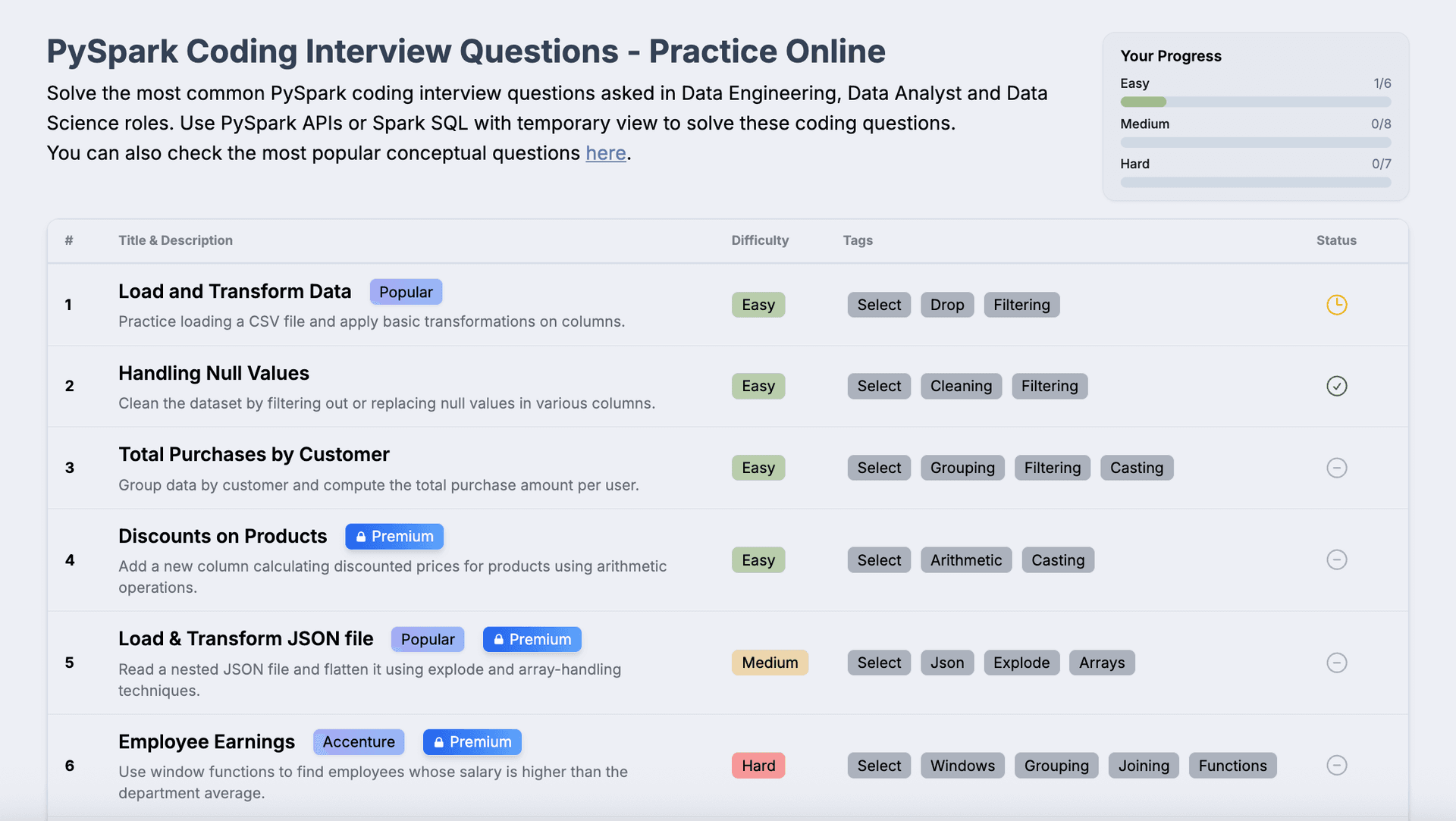
PySpark Interview Questions for Beginners
1. What is PySpark?
PySpark is the Python API for Apache Spark, a distributed engine for processing large datasets in parallel across a cluster. You write Python, but the heavy lifting (DataFrame operations, joins, aggregations) runs on the JVM inside Spark's optimized engine, so DataFrame code is nearly as fast as Scala. PySpark covers batch processing (Spark SQL / DataFrames), streaming (Structured Streaming) and machine learning (MLlib).
2. Why use PySpark instead of pandas?
pandas runs on a single machine and must fit the data in that machine's memory. PySpark splits data into partitions and processes them in parallel on many machines, so it scales to terabytes. Use pandas for small data and quick analysis; use PySpark when the data or compute does not fit on one machine, or when you need fault tolerance and integration with data lakes. The pandas API on Spark (pyspark.pandas) lets you use pandas-style syntax on Spark when needed.
3. What is the difference between RDD, DataFrame and Dataset?
- RDD (Resilient Distributed Dataset): the low-level, immutable distributed collection of objects. No schema and no Catalyst optimization; you control everything.
- DataFrame: a distributed table with named columns and a schema. Queries go through the Catalyst optimizer and Tungsten engine, so they are much faster than equivalent RDD code.
- Dataset: a typed DataFrame, available only in Scala/Java. In PySpark you work with DataFrames (in Scala,
DataFrame = Dataset[Row]).
In interviews, say you use DataFrames by default and drop to RDDs only for very custom low-level logic. Deep dives: RDDs in Spark and DataFrames & Datasets.
4. What is SparkSession?
SparkSession is the single entry point to Spark since 2.0. It replaces the old SQLContext and HiveContext and wraps the SparkContext. You use it to read data, create DataFrames, run SQL and set configuration. See setting up a Spark session.
5. How do you create a DataFrame in PySpark?
1from pyspark.sql import SparkSession
2from pyspark.sql.types import StructType, StructField, StringType, IntegerType
3
4spark = SparkSession.builder.appName("demo").getOrCreate()
5
6# 1. From a list of tuples + column names
7df1 = spark.createDataFrame([("Asha", 34), ("Ravi", 28)], ["name", "age"])
8
9# 2. With an explicit schema (recommended for production)
10schema = StructType([
11    StructField("name", StringType(), True),
12    StructField("age", IntegerType(), True),
13])
14df2 = spark.createDataFrame([("Meera", 41)], schema)
15
16# 3. From files
17# df3 = spark.read.csv("people.csv", header=True, schema=schema)
18# df4 = spark.read.parquet("s3://bucket/people/")
6. How do you read and write CSV and Parquet files?
1df = (spark.read
2      .option("header", True)
3      .option("inferSchema", True)   # convenient, but costs an extra pass over the data
4      .csv("input/sales.csv"))
5
6(df.write
7   .mode("overwrite")              # append | overwrite | ignore | error (default)
8   .partitionBy("country")
9   .parquet("output/sales_parquet"))
Mention that inferSchema reads the data twice, so production jobs should pass an explicit schema. More in reading CSV files, reading and writing files and inferSchema in PySpark.
7. What are transformations and actions?
Transformations (select, filter, withColumn, join, groupBy) describe a new DataFrame and are lazy, so nothing runs yet. Actions (count, show, collect, write, take) trigger execution and return a result to the driver or write to storage. Every action launches at least one Spark job. Read: transformations and actions in Spark.
8. What is lazy evaluation in Spark and why is it useful?
Spark does not execute transformations immediately; it records them in a logical plan (a DAG) and only runs when an action is called. This lets Spark see the whole pipeline and optimize it: push filters down to the data source, prune unused columns, combine narrow steps into one stage, and pick the best join strategy. It also avoids computing data that is never used. See lazy evaluation and the DAG.
9. What is the difference between narrow and wide transformations?
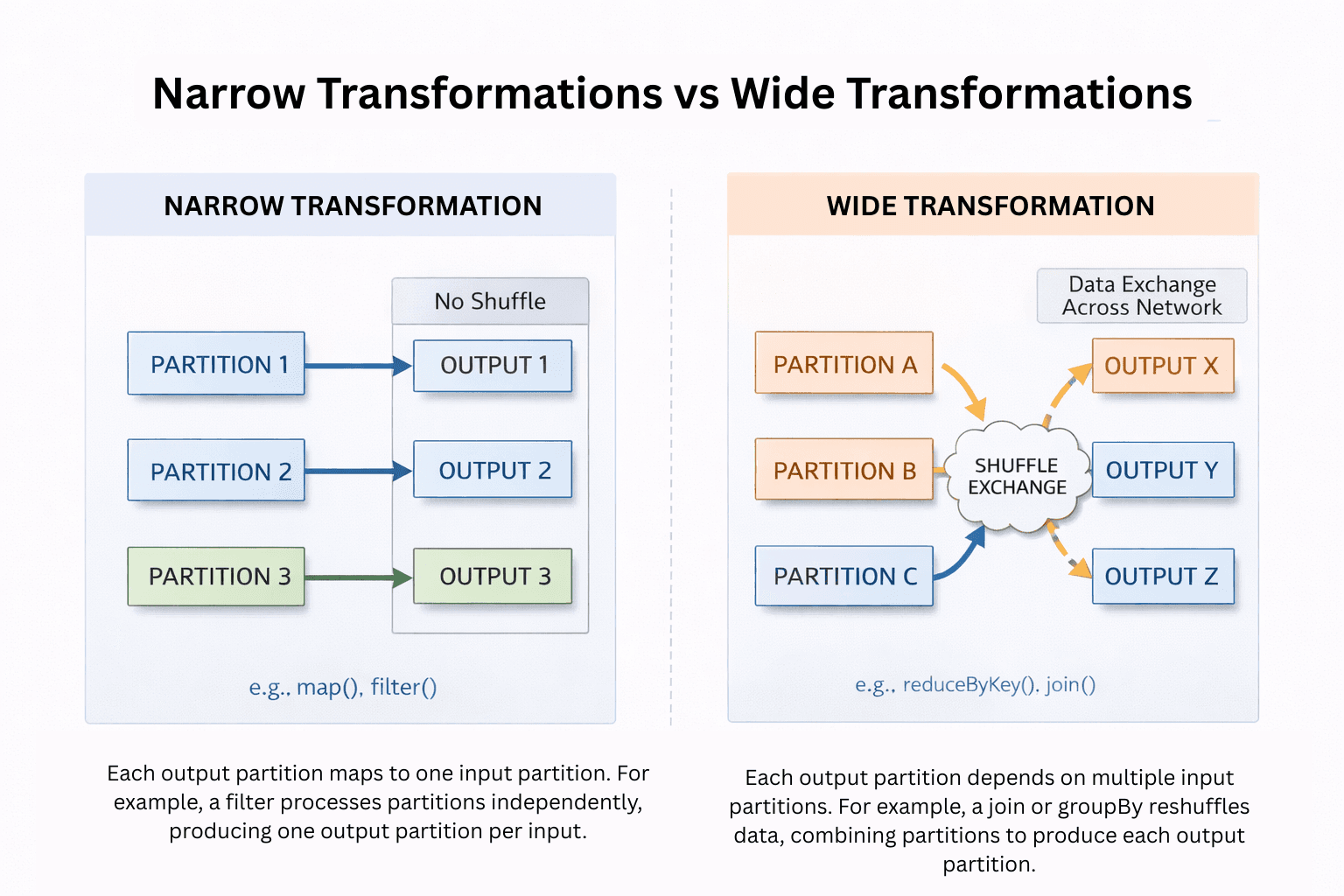
In a narrow transformation (filter, select, withColumn, map) each output partition depends on one input partition, so no data moves across the network. In a wide transformation (groupBy, join, distinct, orderBy, repartition) an output partition needs data from many input partitions, which requires a shuffle. Shuffles are the most expensive operation in Spark and they create stage boundaries.
10. What is the difference between select, withColumn and selectExpr?
select returns only the columns you list (and can compute new ones). withColumn adds or replaces a single column and keeps everything else. selectExpr takes SQL expression strings, e.g. df.selectExpr("price * qty as revenue"). Calling withColumn in a long loop creates a huge plan. When adding many columns, use a single select or withColumns (Spark 3.3+).
11. What is the difference between collect(), take() and show()?
collect() brings the entire DataFrame to the driver as a list of Rows, so on big data it causes a driver OutOfMemoryError. take(n) and limit(n) return only n rows. show(n) prints n rows and returns nothing. In interviews, always point out that collect() should only be used on small, already-aggregated results.
12. How do you handle null values in PySpark?
1df.dropna(subset=["customer_id"])                      # drop rows where key is null
2df.fillna({"city": "Unknown", "amount": 0})            # per-column defaults
3df.withColumn("city", F.coalesce("city", "billing_city", F.lit("Unknown")))
4df.filter(F.col("email").isNull())                     # never use == None
Also mention null-safe equality (eqNullSafe / <=>) for joins and comparisons where both sides can be null. Tutorial: handling nulls in PySpark.
13. What is the difference between groupByKey and reduceByKey?
Both are RDD operations. reduceByKey combines values on each partition first (a map-side combine) and only shuffles the partial results. groupByKey shuffles every single value across the network and then groups them, which uses far more network and memory and can cause OOM on skewed keys. Prefer reduceByKey / aggregateByKey, and for DataFrames simply use groupBy().agg(), which does partial aggregation automatically.
Spark Architecture Interview Questions
14. Explain Spark architecture.
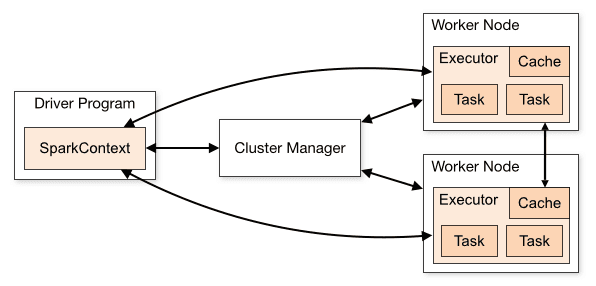
A Spark application has one driver and many executors, coordinated by a cluster manager.
- Driver: runs your
mainprogram, creates the SparkSession, builds the logical and physical plans, splits work into jobs, stages and tasks, and schedules tasks on executors. - Cluster manager: allocates resources (YARN, Kubernetes, Spark standalone; Mesos support was removed in Spark 4.0).
- Executors: JVM processes on worker nodes that run tasks, keep cached data in memory or on disk, and send results back to the driver.
Full explanation: Apache Spark architecture.
15. What are jobs, stages and tasks in Spark?
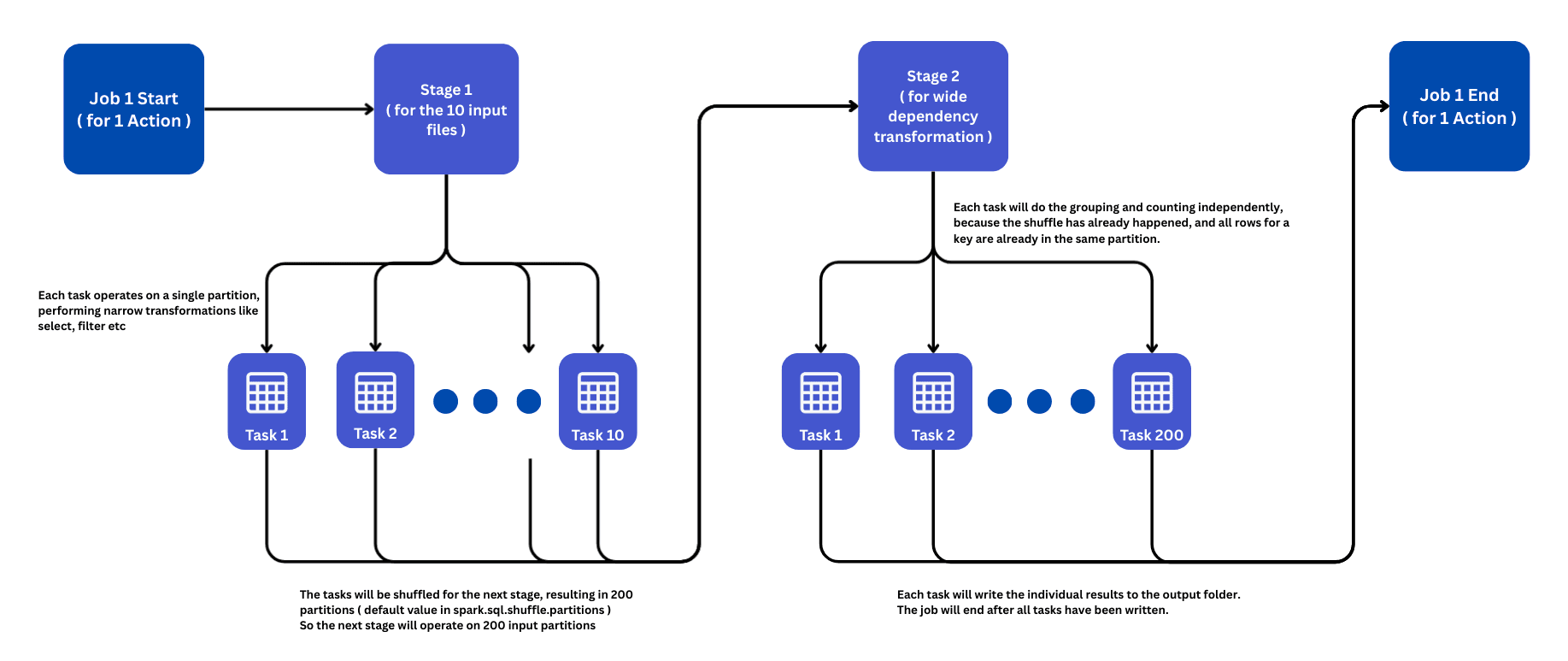
- Job: created for every action (
count,write, ...). - Stage: a job is split into stages at shuffle boundaries (every wide transformation starts a new stage).
- Task: the smallest unit of work: one task per partition per stage, executed by one executor core.
Example: reading 10 files, filtering, then groupBy and writing gives one job with two stages: stage 1 has 10 tasks (one per input partition), stage 2 has 200 tasks (the default spark.sql.shuffle.partitions).
More: jobs, stages and tasks.
16. What is a DAG in Spark?
The DAG (Directed Acyclic Graph) is the graph of transformations Spark builds from your code. The DAG scheduler on the driver cuts it into stages at shuffle boundaries and submits each stage's tasks to the task scheduler. You can see the DAG for every job in the Spark UI, which is the first place to look when a job is slow.
17. What is the difference between client mode and cluster mode?
In client mode the driver runs on the machine that submitted the job (e.g. your laptop or an edge node). It is good for interactive work, but the job dies if that machine disconnects. In cluster mode the driver runs inside the cluster on a worker node. This is the standard choice for production jobs.
18. How does Spark achieve fault tolerance?
Through lineage. Every RDD/DataFrame remembers the transformations used to build it from the source data. If an executor dies and a partition is lost, Spark recomputes just that partition from its lineage instead of replicating data. Shuffle files and checkpoints (checkpoint()) shorten recomputation for long lineages, and failed tasks are retried automatically (spark.task.maxFailures, default 4).
19. What is the difference between Spark 3 and Spark 4?
Spark 3 introduced Adaptive Query Execution, Dynamic Partition Pruning and big pandas API improvements. Spark 4.0 (2025) turns ANSI SQL mode on by default (invalid casts and overflows now raise errors instead of returning null), makes Spark Connect a first-class client-server option, adds the VARIANT type for semi-structured JSON, the Python Data Source API, SQL pipe syntax and more. Mentioning ANSI mode is a strong signal that you have used recent Spark versions.
PySpark Performance Optimization Interview Questions
20. What is the Catalyst optimizer?
Catalyst is Spark SQL's query optimizer. Every DataFrame or SQL query goes through four phases:
- Analysis: resolve column and table names against the catalog (unresolved → resolved logical plan).
- Logical optimization: rule-based rewrites such as predicate pushdown, column pruning, constant folding and combining filters.
- Physical planning: generate physical plans and choose one with a cost model (e.g. broadcast join vs sort-merge join).
- Code generation: whole-stage code generation (Tungsten) compiles the plan into optimized JVM bytecode.
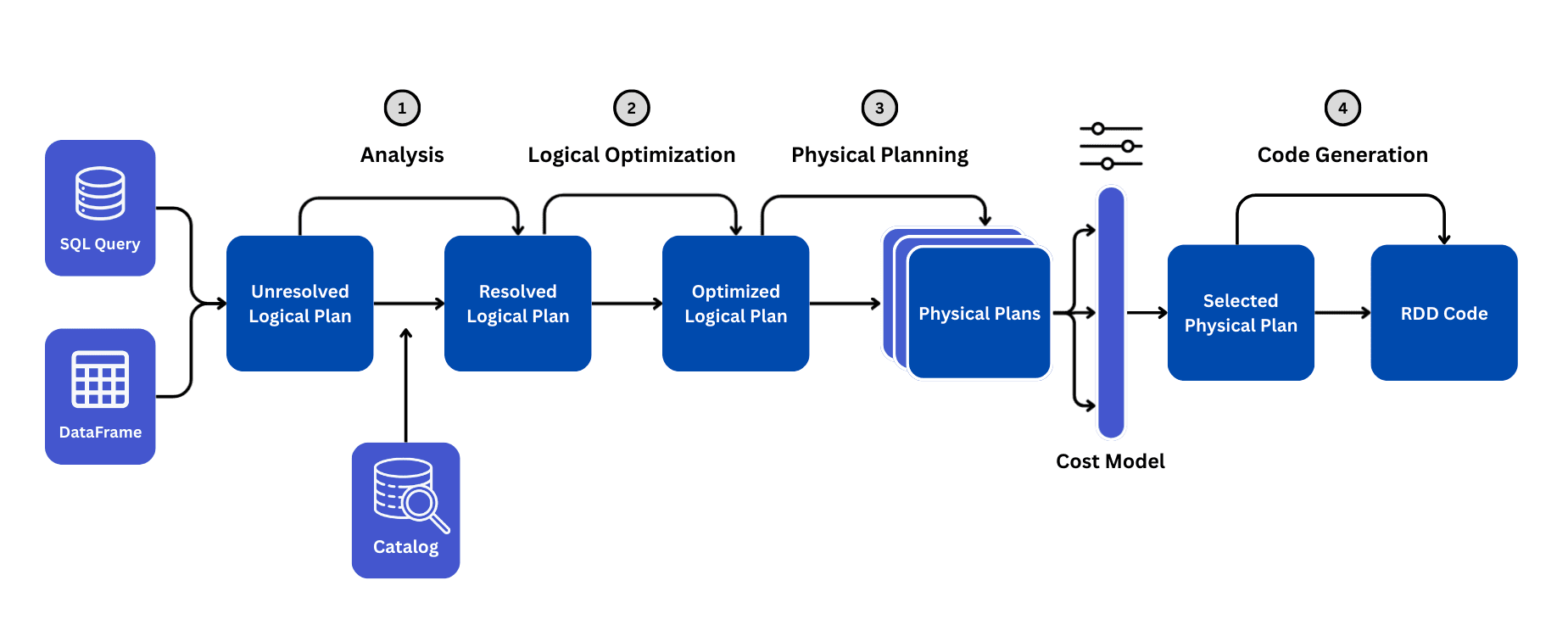
You can see all of the plans with df.explain("extended"). Deep dive: Catalyst optimizer in Spark.
21. What is Adaptive Query Execution (AQE)?
AQE (enabled by default since Spark 3.2) re-optimizes the query at runtime using real statistics collected after each shuffle stage. It does three main things:
- Coalesces shuffle partitions: merges many tiny partitions so you do not run 200 near-empty tasks.
- Switches join strategies: converts a sort-merge join into a broadcast join when one side turns out to be small.
- Handles skewed joins: splits oversized partitions into smaller tasks.
Read more: Adaptive Query Execution.
22. How do you optimize a slow PySpark job?
- Read the Spark UI first: find the slowest stage, look for skewed tasks, spill to disk and large shuffles.
- Read less data: use Parquet/Delta, select only needed columns, filter early so predicates are pushed down, and partition data by common filter columns.
- Shuffle less: broadcast small tables, avoid unnecessary
distinct/orderBy, and pre-aggregate before joins. - Right-size partitions: aim for roughly 100–200 MB per partition and tune
spark.sql.shuffle.partitions(or let AQE coalesce). - Fix skew: AQE skew join, salting, or isolating hot keys.
- Avoid Python UDFs: use built-in functions or pandas UDFs.
- Cache wisely: only DataFrames that are reused, and
unpersist()when done. - Tune resources: executor memory, cores and dynamic allocation.
23. What is predicate pushdown and column pruning?
Predicate pushdown sends filters down to the data source so files or row groups that cannot match are skipped (Parquet uses min/max statistics for this). Column pruning reads only the columns the query actually uses, which is very effective for columnar formats like Parquet and ORC. Both happen automatically when you filter and select early; you can confirm them as PushedFilters and ReadSchema in explain().
24. What is Dynamic Partition Pruning?
DPP (Spark 3.0+) skips partitions of a large partitioned fact table at runtime based on a filter applied to a dimension table in a join. For example, joining sales (partitioned by date_id) with dates WHERE year = 2025 makes Spark read only the 2025 partitions of sales, even though the filter was written on the other table. See dynamic partition pruning.
25. Why are Python UDFs slow and what should you use instead?
A regular Python UDF is a black box to Catalyst (no optimization) and each row is serialized from the JVM to a Python worker and back. Prefer, in order: built-in functions in pyspark.sql.functions → pandas UDFs (vectorized, use Apache Arrow to move whole batches) → Arrow-optimized Python UDFs (useArrow=True, Spark 3.5+) → plain UDFs as a last resort.
1import pandas as pd
2from pyspark.sql.functions import pandas_udf
3
4@pandas_udf("double")
5def add_tax(amount: pd.Series) -> pd.Series:
6    return amount * 1.18
7
8df.withColumn("amount_with_tax", add_tax("amount"))
9
10# Even better: use a built-in expression when one exists
11df.withColumn("amount_with_tax", F.col("amount") * 1.18)
26. What is the difference between cache() and persist()?
Both keep a DataFrame around after it is first computed so later actions reuse it. cache() uses the default storage level (memory, spilling to disk for DataFrames). persist() lets you choose the level: MEMORY_ONLY, MEMORY_AND_DISK, DISK_ONLY, serialized or replicated variants. Caching is lazy: it happens on the next action. Only cache data that is reused several times, and call unpersist() afterwards.
Partitioning, Shuffle and Join Interview Questions
27. What is the difference between repartition() and coalesce()?
repartition(n)orrepartition(n, "col")performs a full shuffle and can increase or decrease partitions, producing evenly sized partitions (optionally hash-partitioned by a column).coalesce(n)only decreases partitions by merging existing ones without a full shuffle, so it is cheaper but can create uneven partitions.
Use coalesce to reduce output files before a write; use repartition to increase parallelism or partition by a key before a heavy operation. More: repartition and coalesce.
28. What is the difference between partitionBy() and bucketBy()?
partitionBy("country") on write creates one folder per value, so queries filtering on that column skip whole folders. It is best for low-cardinality columns such as date or country. bucketBy(n, "customer_id") hashes rows into a fixed number of files per partition and must be saved as a table; joins and aggregations on the bucket column between tables bucketed the same way can avoid a shuffle, which is useful for high-cardinality join keys. See partitioning and bucketing.
29. What is a shuffle and why is it expensive?
A shuffle redistributes data across executors so that rows with the same key end up in the same partition (needed for joins, groupBy, distinct, window partitions). It is expensive because data is serialized, written to local disk, sent over the network and read back. Reducing the volume of shuffled data is usually the biggest performance win.
30. What is spark.sql.shuffle.partitions?
It sets the number of partitions after a shuffle in DataFrame/SQL operations; the default is 200. Too few partitions → huge tasks and disk spill; too many → thousands of tiny tasks and small output files. With AQE enabled, Spark can automatically coalesce post-shuffle partitions, so a common pattern is to set it relatively high and let AQE shrink it.
31. What join strategies does Spark use?
- Broadcast hash join: the small table is copied to every executor; no shuffle of the big table. Chosen automatically when one side is under
spark.sql.autoBroadcastJoinThreshold(10 MB by default). - Sort-merge join: both sides are shuffled and sorted by the key, then merged. Default for large-to-large equi-joins.
- Shuffle hash join: both sides shuffled, a hash table built on the smaller side per partition.
- Broadcast nested loop join / Cartesian product: used for non-equi joins and cross joins. Very expensive.
Deep dive with diagrams: join strategies in Spark.
32. What is a broadcast join and when should you use it?
A broadcast join sends a full copy of a small DataFrame to every executor so the large DataFrame can be joined locally without shuffling. Use it when one side comfortably fits in executor memory (dimension and lookup tables). Do not broadcast large tables, as it can cause driver or executor OOM.
1from pyspark.sql import functions as F
2
3result = orders.join(F.broadcast(countries), "country_code", "left")
33. What join types does PySpark support?
inner, left (left_outer), right, full (outer), left_semi (rows on the left that have a match, like EXISTS), left_anti (rows on the left without a match, like NOT EXISTS) and cross. Semi and anti joins are frequently asked because they solve "customers with/without orders" questions without duplicates. Tutorial: joining data in PySpark.
34. What are window functions and when do you use them?
Window functions compute a value for each row using a group of related rows (the window) without collapsing rows like groupBy does. You define a window with Window.partitionBy(...).orderBy(...) and an optional frame (rowsBetween / rangeBetween). Typical uses: ranking (row_number, rank, dense_rank), running totals, moving averages, and comparing with previous/next rows (lag, lead). See window functions, lead and lag and rowsBetween vs rangeBetween.
35. What is the difference between row_number, rank and dense_rank?
For salaries 100, 90, 90, 80: row_number gives 1, 2, 3, 4 (always unique); rank gives 1, 2, 2, 4 (ties share a rank and leave gaps); dense_rank gives 1, 2, 2, 3 (ties share a rank, no gaps). Use dense_rank for "Nth highest salary" and row_number for de-duplication.
Data Skew Interview Questions
36. What is data skew in Spark?
Data skew happens when a few keys have far more rows than others, so after a shuffle one partition is much larger than the rest. That partition's task runs for a very long time (or fails with OOM) while all other tasks are finished. This is the classic "stuck at 199/200 tasks" symptom. In the Spark UI you see one task with a much longer duration and much larger shuffle read than the median.
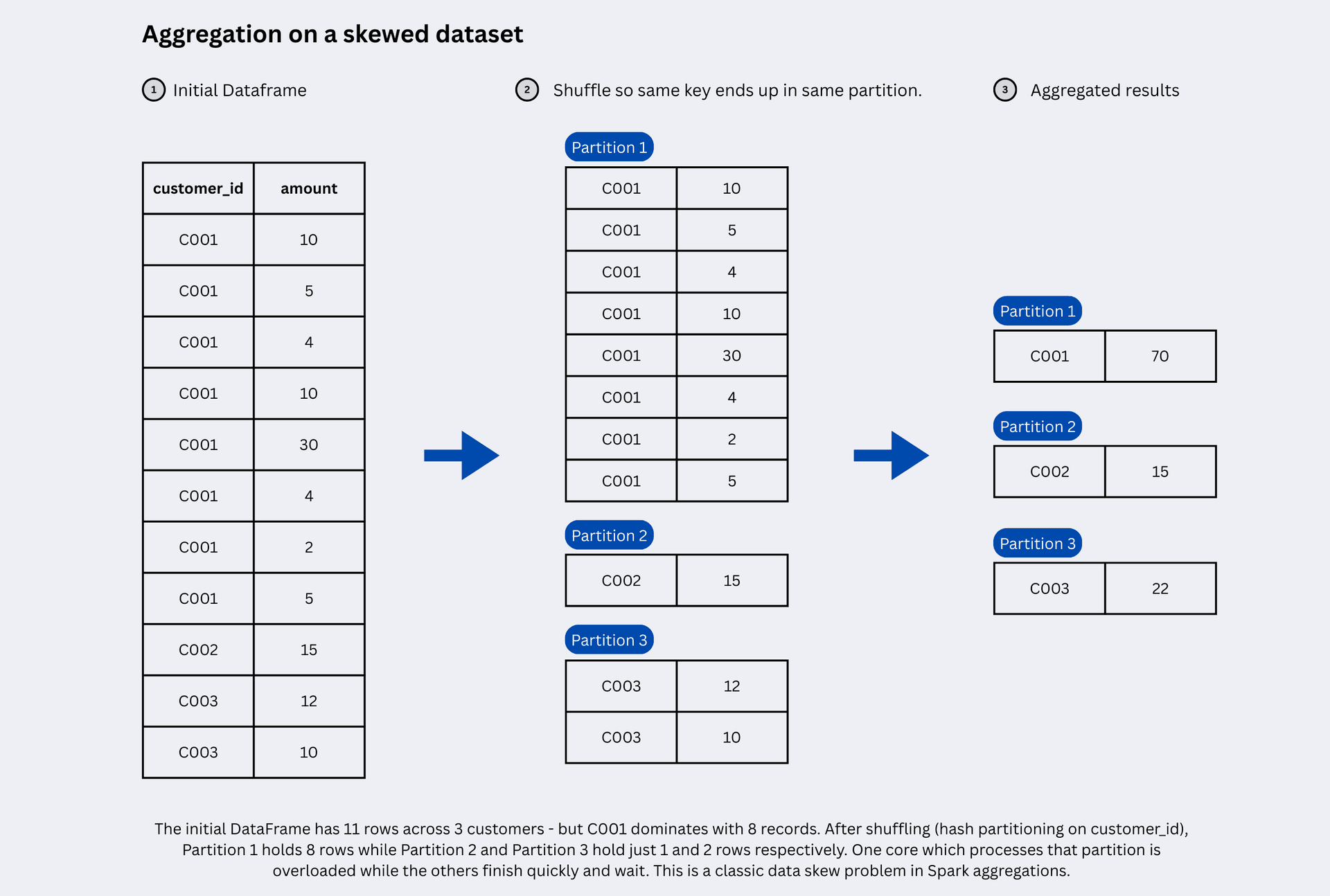
37. How do you fix data skew?
- Enable AQE skew join handling (
spark.sql.adaptive.skewJoin.enabled, on by default with AQE): Spark splits oversized partitions automatically. - Broadcast the smaller table if it fits in memory, so there is no shuffle and no skew.
- Salting: add a random suffix to the hot key so its rows spread over N partitions, then aggregate twice or replicate the other side of the join N times.
- Isolate hot keys: process the few heavy keys separately and union the results.
- Filter out junk keys such as null or default values that often cause skew.
38. What is salting in PySpark?
Salting adds a random number (the salt) to a skewed key so that one huge group becomes many smaller groups that are processed in parallel. For aggregations you aggregate on (key, salt) first, then aggregate again on key. For joins, you add a random salt to the big table and replicate each row of the small table once per salt value.
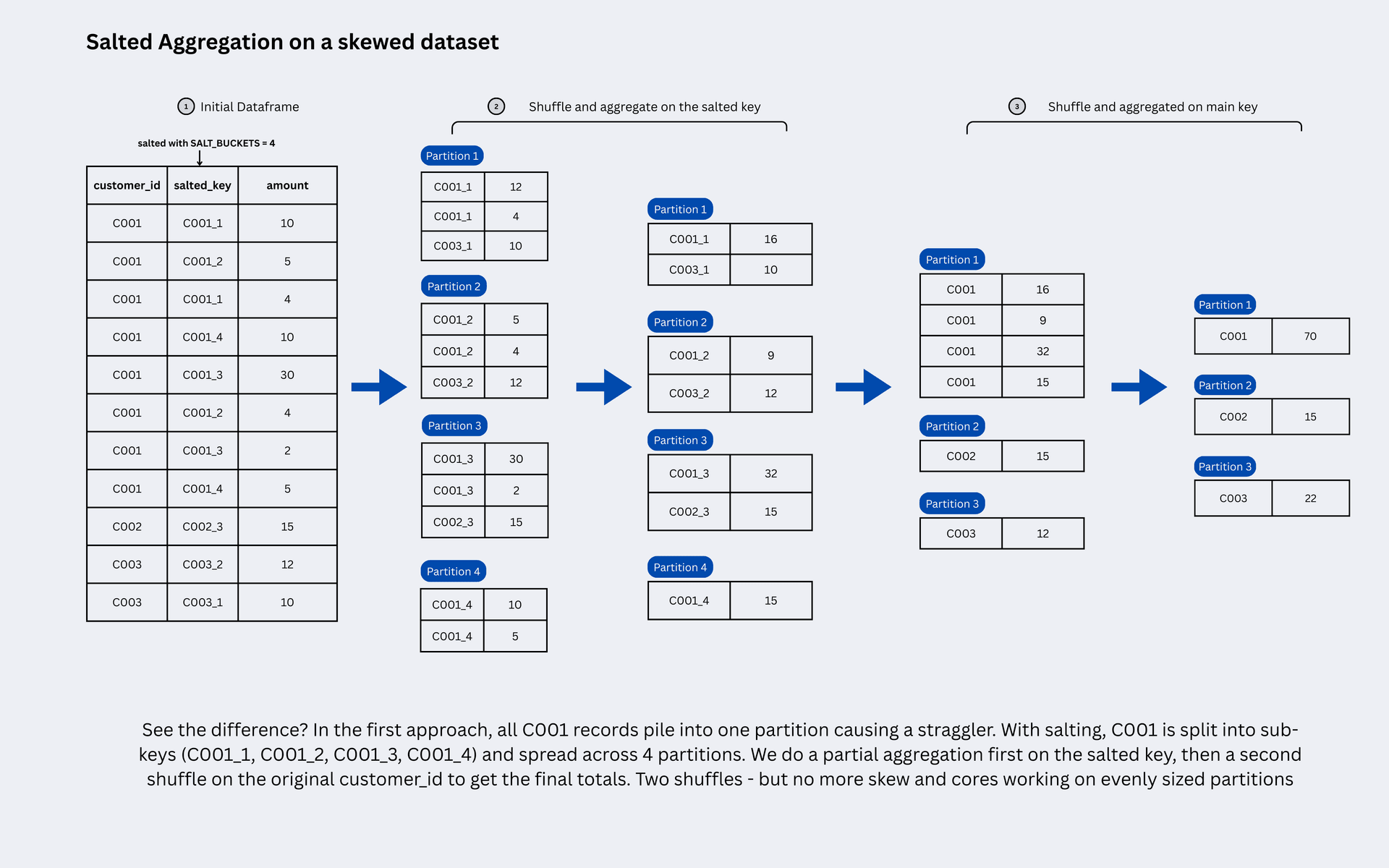
Learn more: data skew and salting and how to fix data skew in Spark.
Spark Memory and Resource Management Interview Questions
39. Explain Spark executor memory.
Each executor container requested from the cluster manager = on-heap memory (spark.executor.memory) + memory overhead (spark.executor.memoryOverhead, default max(384 MB, 10% of executor memory)) for off-heap and Python worker memory. Inside the heap:
- Reserved memory: fixed ~300 MB for Spark internals.
- Unified memory (
spark.memory.fraction, default 0.6 of the rest): shared by execution (shuffles, joins, sorts, aggregations) and storage (cache, broadcast variables). Execution can evict cached blocks when it needs space. - User memory (the remaining 40%): your data structures, UDF objects and metadata.
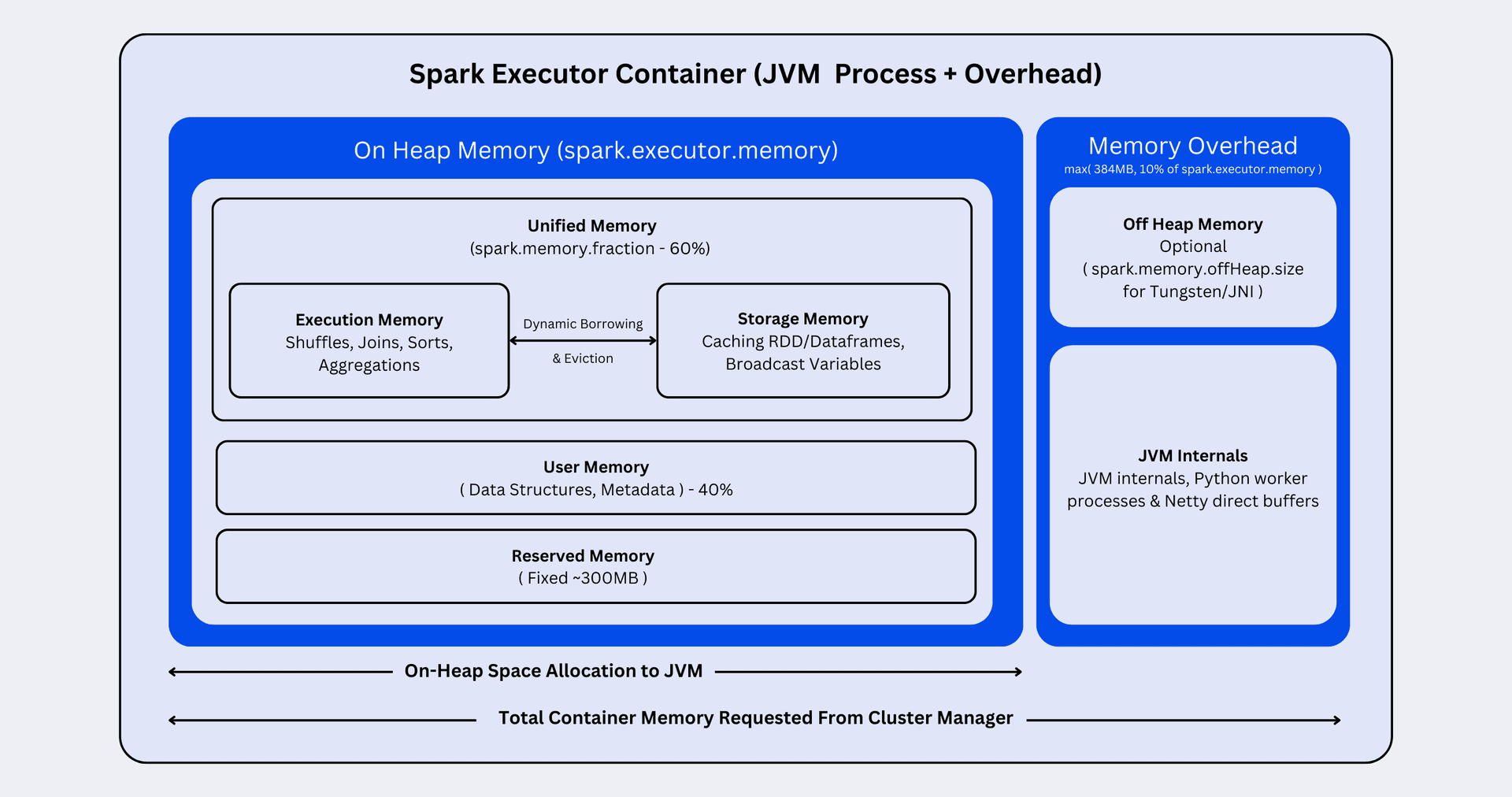
Read the full breakdowns: executor memory and Spark executor memory: a simple guide.
40. What causes OutOfMemoryError in Spark and how do you fix it?
- Driver OOM:
collect()/toPandas()on large data, broadcasting a big table, or a huge number of tiny files/partitions. Fix: aggregate before collecting, write to storage instead, raisespark.driver.memoryonly as a last step. - Executor OOM: skewed partitions, too few shuffle partitions, very wide rows, or large Python UDF batches. Fix: fix skew, increase partitions, increase
spark.executor.memoryor memory overhead (for PySpark workers), reduce cores per executor.
41. What is dynamic resource allocation?
With spark.dynamicAllocation.enabled=true, Spark adds executors when tasks are waiting (requesting them exponentially: 1, 2, 4, 8, ...) and removes executors that have been idle longer than spark.dynamicAllocation.executorIdleTimeout. It needs either the external shuffle service or shuffle tracking (spark.dynamicAllocation.shuffleTracking.enabled) so shuffle files are not lost when executors are removed.
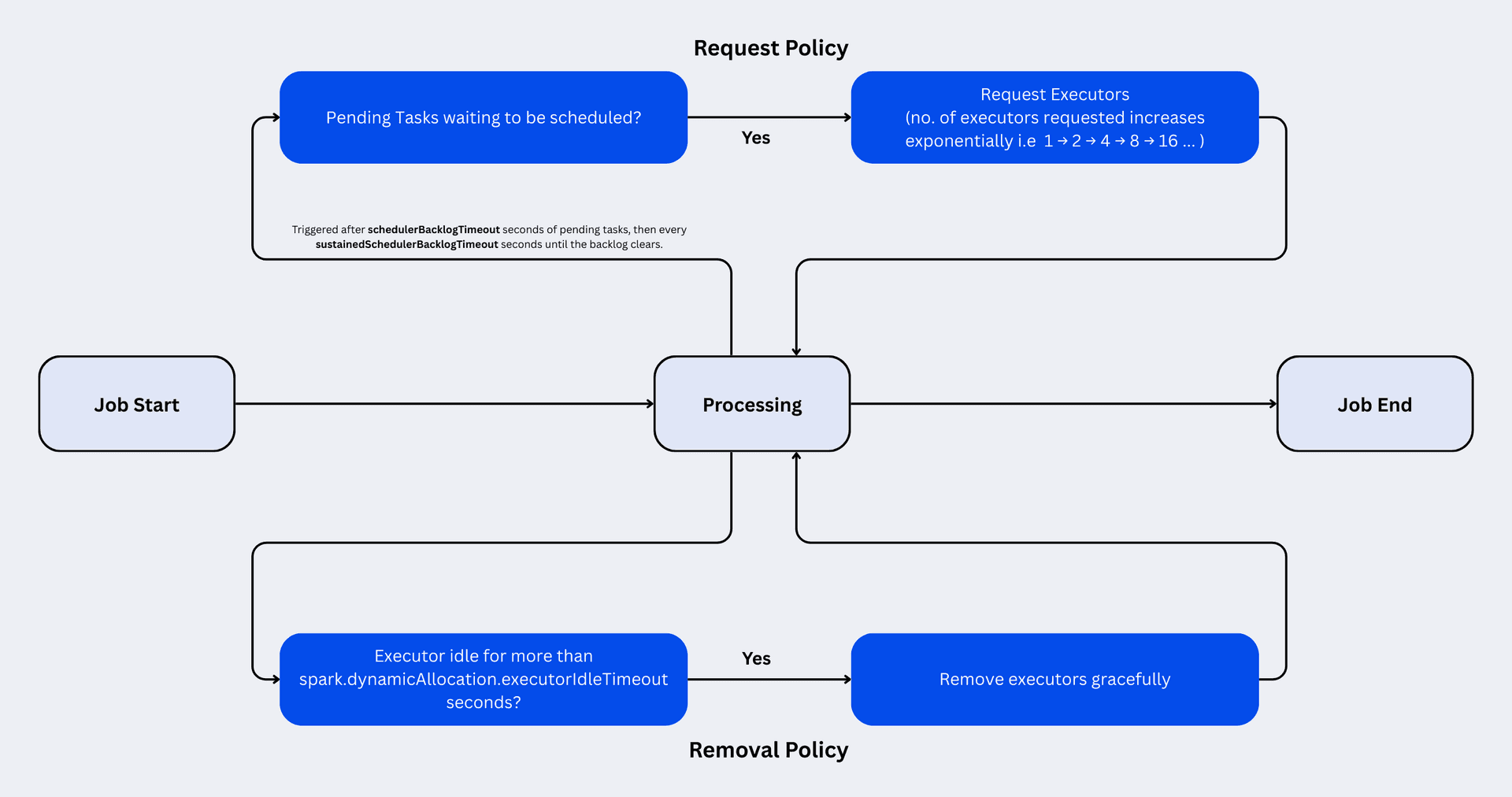
More: dynamic resource allocation.
42. How do you decide the number of executors, cores and memory?
A common rule of thumb: 4–5 cores per executor (more hurts I/O throughput, fewer wastes memory on overhead), leave 1 core and ~1 GB per node for the OS and daemons, and divide the remaining memory per executor minus ~10% overhead. Then size total cores from the data: e.g. 100 GB at ~128 MB per partition ≈ 800 tasks; with 200 cores that is about 4 waves of tasks. Always validate in the Spark UI rather than trusting the formula.
43. What are broadcast variables and accumulators?
A broadcast variable ships a read-only value (e.g. a lookup dictionary) to every executor once, instead of with every task. An accumulator is a write-only shared variable that tasks add to and only the driver can read, handy for counters such as "bad records". Accumulator updates inside transformations can be double counted when tasks are retried, so only rely on them inside actions.
File Formats and Storage Interview Questions
44. Which file formats does Spark support and which is best?
Spark reads and writes CSV, JSON, text, Parquet, ORC, Avro and table formats such as Delta Lake, Apache Iceberg and Apache Hudi. Parquet (or a table format on top of it, like Delta or Iceberg) is the default choice for analytics: columnar, compressed, with schema and statistics for predicate pushdown. Use Avro for row-oriented streaming/ingestion and CSV/JSON only at the edges. See common file formats.
45. What is the difference between row-based and columnar storage?
Row formats (CSV, Avro) store all values of a row together, which is good for writing whole records. Columnar formats (Parquet, ORC) store all values of a column together, so analytical queries read only the needed columns and compress much better because similar values sit next to each other.
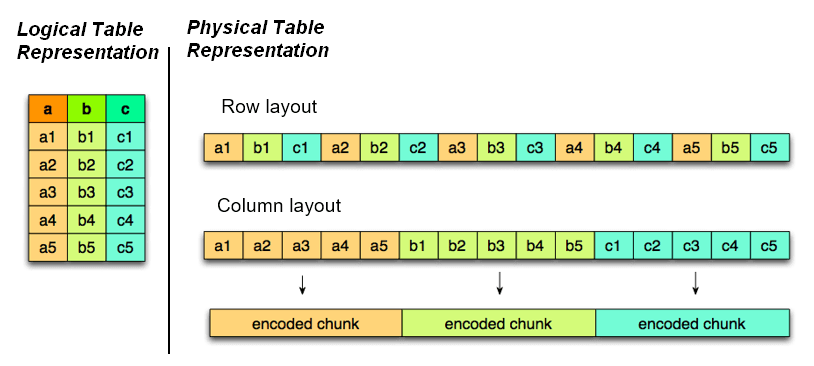
46. What is the small files problem and how do you fix it?
Thousands of tiny files slow down every read (each file means metadata calls and a task) and overload the driver/metastore. Causes: too many shuffle partitions at write time, partitionBy on a high-cardinality column, or frequent streaming micro-batches. Fixes: coalesce/repartition before writing, AQE partition coalescing, sensible partition columns, and periodic compaction (OPTIMIZE in Delta Lake).
47. What is the difference between Delta Lake and Parquet?
Delta Lake stores data as Parquet files plus a transaction log. That adds ACID transactions, MERGE/UPDATE/DELETE, schema enforcement and evolution, time travel and file compaction on top of plain Parquet. Interviewers ask this to check if you understand lakehouse tables beyond raw files.
PySpark Coding Interview Questions (With Solutions)
These are the coding questions that come up most often in PySpark rounds. Try each one yourself first. You can practise all of them, plus many more with test cases, in the PySpark coding interview questions section.
48. Remove duplicates and keep the latest record per key
1from pyspark.sql import SparkSession, Window, functions as F
2spark = SparkSession.builder.getOrCreate()
3
4df = spark.createDataFrame([
5    (1, "Asha", "Pune",   "2024-01-01"),
6    (1, "Asha", "Mumbai", "2024-03-01"),
7    (2, "Ravi", "Delhi",  "2024-02-01"),
8], ["id", "name", "city", "updated_at"])
9
10w = Window.partitionBy("id").orderBy(F.col("updated_at").desc())
11
12latest = (df.withColumn("rn", F.row_number().over(w))
13            .filter("rn = 1")
14            .drop("rn"))
15latest.show()
Why not dropDuplicates(["id"])? It keeps an arbitrary row. A window with row_number() lets you control which row survives.
49. Find the second highest salary in each department
1from pyspark.sql import SparkSession, Window, functions as F
2spark = SparkSession.builder.getOrCreate()
3
4emp = spark.createDataFrame([
5    ("Asha", "IT", 120), ("Ravi", "IT", 100), ("Neel", "IT", 100),
6    ("Meera", "HR", 90), ("John", "HR", 70),
7], ["name", "dept", "salary"])
8
9w = Window.partitionBy("dept").orderBy(F.col("salary").desc())
10
11second_highest = (emp.withColumn("rnk", F.dense_rank().over(w))
12                     .filter("rnk = 2")
13                     .drop("rnk"))
14second_highest.show()
Use dense_rank so employees with the same salary share a rank (here Ravi and Neel are both second in IT).
50. Calculate a running total per customer
1from pyspark.sql import SparkSession, Window, functions as F
2spark = SparkSession.builder.getOrCreate()
3
4txn = spark.createDataFrame([
5    ("c1", "2024-01-01", 100), ("c1", "2024-01-05", 50),
6    ("c1", "2024-01-09", 25),  ("c2", "2024-01-02", 70),
7], ["customer_id", "txn_date", "amount"])
8
9w = (Window.partitionBy("customer_id")
10           .orderBy("txn_date")
11           .rowsBetween(Window.unboundedPreceding, Window.currentRow))
12
13txn.withColumn("running_total", F.sum("amount").over(w)).show()
51. Find the top 3 products by revenue in each category
1from pyspark.sql import SparkSession, Window, functions as F
2spark = SparkSession.builder.getOrCreate()
3
4sales = spark.createDataFrame([
5    ("Electronics", "Phone", 900), ("Electronics", "Laptop", 1500),
6    ("Electronics", "Earbuds", 200), ("Electronics", "Tablet", 600),
7    ("Books", "Novel", 120), ("Books", "Comics", 80),
8], ["category", "product", "revenue"])
9
10w = Window.partitionBy("category").orderBy(F.col("revenue").desc())
11
12top3 = (sales.withColumn("rank", F.row_number().over(w))
13             .filter(F.col("rank") <= 3))
14top3.show()
52. Word count in PySpark (DataFrame and RDD)
1from pyspark.sql import SparkSession, functions as F
2spark = SparkSession.builder.getOrCreate()
3
4lines = spark.createDataFrame([("Spark is fast",), ("PySpark is Spark in Python",)], ["line"])
5
6word_counts = (lines
7    .select(F.explode(F.split(F.lower("line"), r"\s+")).alias("word"))
8    .groupBy("word")
9    .count()
10    .orderBy(F.desc("count")))
11word_counts.show()
12
13# RDD version (often asked as a follow-up)
14rdd_counts = (lines.rdd
15    .flatMap(lambda row: row.line.lower().split())
16    .map(lambda w: (w, 1))
17    .reduceByKey(lambda a, b: a + b))
18print(rdd_counts.collect())
53. Find employees who earn more than their manager
1from pyspark.sql import SparkSession, functions as F
2spark = SparkSession.builder.getOrCreate()
3
4emp = spark.createDataFrame([
5    (1, "Asha", 150, None), (2, "Ravi", 160, 1),
6    (3, "Meera", 90, 1),    (4, "John", 120, 2),
7], ["id", "name", "salary", "manager_id"])
8
9e = emp.alias("e")
10m = emp.alias("m")
11
12(e.join(m, F.col("e.manager_id") == F.col("m.id"))
13  .filter(F.col("e.salary") > F.col("m.salary"))
14  .select(F.col("e.name").alias("employee"),
15          F.col("e.salary"),
16          F.col("m.name").alias("manager"),
17          F.col("m.salary").alias("manager_salary"))
18  .show())
This is a self join: alias the DataFrame twice so the column references are unambiguous.
54. Find users who logged in on 3 or more consecutive days
1from pyspark.sql import SparkSession, Window, functions as F
2spark = SparkSession.builder.getOrCreate()
3
4logins = (spark.createDataFrame([
5        ("u1", "2024-05-01"), ("u1", "2024-05-02"), ("u1", "2024-05-03"),
6        ("u1", "2024-05-07"), ("u2", "2024-05-01"), ("u2", "2024-05-03"),
7    ], ["user_id", "login_date"])
8    .withColumn("login_date", F.to_date("login_date"))
9    .dropDuplicates(["user_id", "login_date"]))
10
11w = Window.partitionBy("user_id").orderBy("login_date")
12
13streaks = (logins
14    .withColumn("rn", F.row_number().over(w))
15    # consecutive dates minus their row number give the same "group" date
16    .withColumn("grp", F.expr("date_sub(login_date, rn)"))
17    .groupBy("user_id", "grp")
18    .agg(F.min("login_date").alias("start"),
19         F.max("login_date").alias("end"),
20         F.count("*").alias("days"))
21    .filter("days >= 3"))
22streaks.show()
This is the "gaps and islands" pattern: subtracting the row number from each date gives the same value for every date in a consecutive streak.
55. Pivot rows into columns (monthly sales per product)
1from pyspark.sql import SparkSession, functions as F
2spark = SparkSession.builder.getOrCreate()
3
4sales = spark.createDataFrame([
5    ("Phone", "Jan", 100), ("Phone", "Feb", 120),
6    ("Laptop", "Jan", 300), ("Laptop", "Mar", 280),
7], ["product", "month", "revenue"])
8
9pivoted = (sales.groupBy("product")
10                .pivot("month", ["Jan", "Feb", "Mar"])   # listing values avoids an extra job
11                .agg(F.sum("revenue"))
12                .fillna(0))
13pivoted.show()
56. Parse a JSON string column and explode a nested array
1from pyspark.sql import SparkSession, functions as F
2spark = SparkSession.builder.getOrCreate()
3
4raw = spark.createDataFrame([
5    (1, '{"customer": "Asha", "items": [{"sku": "A1", "qty": 2}, {"sku": "B7", "qty": 1}]}'),
6    (2, '{"customer": "Ravi", "items": [{"sku": "C3", "qty": 5}]}'),
7], ["order_id", "payload"])
8
9schema = "customer STRING, items ARRAY<STRUCT<sku: STRING, qty: INT>>"
10
11items = (raw
12    .withColumn("data", F.from_json("payload", schema))
13    .select("order_id", "data.customer", F.explode("data.items").alias("item"))
14    .select("order_id", "customer", "item.sku", "item.qty"))
15items.show()
57. Forward-fill null values with the last known value
1from pyspark.sql import SparkSession, Window, functions as F
2spark = SparkSession.builder.getOrCreate()
3
4readings = spark.createDataFrame([
5    ("s1", 1, 20.5), ("s1", 2, None), ("s1", 3, None),
6    ("s1", 4, 22.0), ("s2", 1, None), ("s2", 2, 18.0),
7], "sensor string, ts int, temp double")
8
9w = (Window.partitionBy("sensor")
10           .orderBy("ts")
11           .rowsBetween(Window.unboundedPreceding, Window.currentRow))
12
13readings.withColumn("temp_filled", F.last("temp", ignorenulls=True).over(w)).show()
58. Join two DataFrames on different column names without duplicate columns
1from pyspark.sql import SparkSession
2spark = SparkSession.builder.getOrCreate()
3
4orders = spark.createDataFrame([(1, "c1", 50), (2, "c2", 70)], ["order_id", "cust_id", "amount"])
5customers = spark.createDataFrame([("c1", "Asha"), ("c2", "Ravi")], ["customer_id", "name"])
6
7joined = (orders
8    .join(customers, orders.cust_id == customers.customer_id, "inner")
9    .drop(customers.customer_id))       # avoid two key columns in the output
10joined.show()
11
12# Same column name on both sides? Pass the name (or a list) to keep a single column:
13# orders.join(customers, on="customer_id", how="left")
59. Calculate a 7-day rolling average
1from pyspark.sql import SparkSession, Window, functions as F
2spark = SparkSession.builder.getOrCreate()
3
4daily = (spark.createDataFrame([
5        ("2024-01-01", 100), ("2024-01-02", 80), ("2024-01-05", 120),
6        ("2024-01-08", 60),  ("2024-01-09", 90),
7    ], ["day", "revenue"])
8    .withColumn("day", F.to_date("day")))
9
10DAY = 86400
11w = (Window.orderBy(F.col("day").cast("timestamp").cast("long"))
12           .rangeBetween(-6 * DAY, 0))     # last 7 calendar days, even if some days are missing
13
14daily.withColumn("rolling_7d_avg", F.round(F.avg("revenue").over(w), 2)).show()
rangeBetween works on values (here seconds), so missing days are handled correctly; rowsBetween(-6, 0) would simply take the previous 6 rows.
60. Find customers who never placed an order
1from pyspark.sql import SparkSession
2spark = SparkSession.builder.getOrCreate()
3
4customers = spark.createDataFrame([("c1", "Asha"), ("c2", "Ravi"), ("c3", "Meera")], ["customer_id", "name"])
5orders = spark.createDataFrame([(1, "c1"), (2, "c1"), (3, "c3")], ["order_id", "customer_id"])
6
7customers.join(orders, "customer_id", "left_anti").show()
61. Calculate month-over-month growth
1from pyspark.sql import SparkSession, Window, functions as F
2spark = SparkSession.builder.getOrCreate()
3
4monthly = spark.createDataFrame([
5    ("2024-01", 1000), ("2024-02", 1200), ("2024-03", 900),
6], ["month", "revenue"])
7
8w = Window.orderBy("month")
9
10(monthly
11    .withColumn("prev_revenue", F.lag("revenue").over(w))
12    .withColumn("mom_growth_pct",
13        F.round((F.col("revenue") - F.col("prev_revenue")) / F.col("prev_revenue") * 100, 2))
14    .show())
62. Count null values in every column
1from pyspark.sql import SparkSession, functions as F
2spark = SparkSession.builder.getOrCreate()
3
4df = spark.createDataFrame([
5    ("Asha", None, 34), (None, "Pune", None), ("Ravi", "Delhi", 28),
6], "name string, city string, age int")
7
8df.select([
9    F.sum(F.col(c).isNull().cast("int")).alias(c) for c in df.columns
10]).show()
Scenario-Based PySpark Interview Questions
Senior interviews focus on how you debug and design real pipelines. Answer these with a structured approach: symptom → how you would confirm it → fix → how you would prevent it.
63. Your job is stuck at 199/200 tasks for an hour. What do you do?
This is almost always data skew. Open the stage in the Spark UI and compare the max vs median task duration and shuffle read size. Identify the hot key (df.groupBy(key).count().orderBy(desc("count"))). Then fix it: enable AQE skew join, broadcast the smaller side if possible, filter null/default keys, or salt the hot key.
64. A job that ran in 10 minutes now takes 2 hours. How do you investigate?
Compare the old and new runs in the Spark UI/history server: input size (did data grow or did partition pruning stop working?), number of tasks, shuffle size, spill and GC time. Check whether the plan changed (explain()): a broadcast join that became a sort-merge join because a table grew past the threshold is a common cause, as is a new skewed key or many more small files.
65. Your daily pipeline creates duplicates when it is re-run. How do you make it idempotent?
Make each run overwrite exactly the data it owns instead of appending: use dynamic partition overwrite for the run's date partition, or MERGE on a business key in Delta/Iceberg. De-duplicate in the silver layer by key + latest timestamp, and track processed files or batch IDs. See idempotency in data ingestion pipelines.
66. How would you process a 1 TB dataset with PySpark?
Read it as Parquet/Delta with partition pruning and only the needed columns. At ~128–200 MB per partition, 1 TB is ~5,000–8,000 tasks, so pick a cluster where that runs in a few waves (e.g. 50 executors × 5 cores = 250 cores ≈ 30 waves, or scale up for speed). Avoid wide shuffles where possible, broadcast dimensions, let AQE coalesce partitions, write output partitioned by a low-cardinality column and coalesce to avoid small files.
67. When would you choose Structured Streaming over batch?
When data must be processed continuously with low latency (minutes or seconds), e.g. events, CDC or IoT feeds. Structured Streaming uses the same DataFrame API, gives exactly-once guarantees with checkpointing and replayable sources, and supports watermarks for late data. For "incremental batch" you can also run a streaming query with trigger(availableNow=True) on a schedule.
How to Prepare for a PySpark Interview
- Master the DataFrame API: filters, joins, aggregations, window functions, dates and strings. Keep the PySpark cheat sheet handy.
- Understand what happens under the hood: lazy evaluation, stages, shuffles, Catalyst, AQE and memory. The Spark theory tutorials cover each topic with diagrams.
- Practise coding problems daily: solve problems in the PySpark coding interview questions bank and try LeetCode SQL questions in PySpark.
- Build 2–3 real projects you can talk about in depth. See PySpark projects for practice.
- Learn to read the Spark UI and `explain()` output, because most senior questions come back to this.
For a step-by-step plan, read how to prepare for PySpark coding interviews.
FAQ
What are the most common PySpark interview questions?
The most frequently asked topics are: RDD vs DataFrame, transformations vs actions, lazy evaluation, narrow vs wide transformations, repartition vs coalesce, broadcast joins, data skew and salting, cache vs persist, Catalyst and AQE, plus coding questions on window functions (top N per group, running totals, de-duplication) and joins.
Is PySpark asked in data engineer interviews?
Yes. PySpark is one of the most requested skills for data engineer roles, especially at companies using Databricks, AWS EMR/Glue or GCP Dataproc. Most loops include a theory round and a live coding round in PySpark or Spark SQL.
How should freshers prepare for PySpark interviews?
Focus on the basics section above, practise the first 8 coding questions until you can write them without looking, and build one small end-to-end project. Being able to explain lazy evaluation and shuffles clearly matters more than memorising configuration names.
Where can I practise PySpark interview questions online?
You can run every snippet on this page in the free Spark Playground PySpark online compiler, and practise interview-style problems with test cases in the PySpark coding questions section, with no installation needed.